``` Click to load calendar by Framasoft. ```{=html}
``` ::: ```{=html} ``` If you want to view the calendar in Framagenda, the link is [here](https://framagenda.org/apps/calendar/p/cBC5qzRqYE6ctbFH). If you want to add this calendar to your own planner, there is also a [.icl subscription link](https://framagenda.org/remote.php/dav/public-calendars/cBC5qzRqYE6ctbFH?export). ## Perpetual pomodoro Recommendations: - **Work time** (from 0 to 25 minutes and 30 to 55 minutes each hour): Enable video, mute audio, work in silence with co-workers. - **Break time** (from 25 to 30 minutes and 55 to 60 minutes each hour): When the music starts, enable audio and discuss what you have been working on with co-workers. Whenever you join, just start working until the next break. If you don't feel like starting, remember that you don't always *get* to feel like starting before starting, but if you start *despite* this, you'll probably feel great about it by the next break. ```{=html}``` Options: ```{=html}
``` ```{=html}``` ``{=html} Play music during breaks. ```{=html}
``` ```{=html}``` ``{=html} Show full music controls. ```{=html}
``` ```{=html}``` ```{=html} `{=html} ```{=html}
``` ::: {style="position:relative;"} `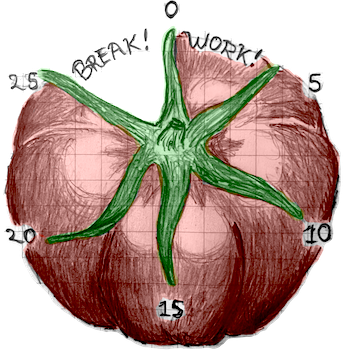 `{=html}
::: {#hand style="position:absolute;top:45%;left:50%;z-index:1;height:8px;width:150px;
background-color:black;border-radius:8px;border:2px solid #eee;
transform-origin: 0%;transform: rotate(-90deg);"}
:::
:::
```{=html}
```
## Video chat
```{=html}
```
::: {#enable-video-button onclick="enableVideo()" style="display:block;width:100%;height:50px;border:2px solid black;background:#ddd;"}
```{=html}
`{=html}
::: {#hand style="position:absolute;top:45%;left:50%;z-index:1;height:8px;width:150px;
background-color:black;border-radius:8px;border:2px solid #eee;
transform-origin: 0%;transform: rotate(-90deg);"}
:::
:::
```{=html}
```
## Video chat
```{=html}
```
::: {#enable-video-button onclick="enableVideo()" style="display:block;width:100%;height:50px;border:2px solid black;background:#ddd;"}
```{=html}
``` Click to launch audio + video chat by Briefing. ```{=html}
``` ::: ```{=html} ``` Instructions: 1. Launch audio/video chat by pressing the above box. 2. Grant permissions for audio/video (video will immediately be shared with anyone else who is online). 3. If there is an error dialog, dismiss it by clicking "Accept" or "Deny". Configuration/use: - Mute audio/video as desired with control panel (bottom centre). - Configure audio/video source using settings menu (bottom left). - Share screen using settings menu (bottom left). - Enter fullscreen mode using fullscreen button (bottom right). - Exit the call by refreshing this page. If you want to join from the Briefing app, the meeting link is [https://brie.fi/ng/todo-club](https://brie.fi/ng/todo-club?audio=0&video=1&fs=1&invite=0&prefs=1&share=0&chat=0). ## History Todo club is a place for getting things done, together. The things we do vary from small things like catching up on emails to big things like working on ambitious work and personal projects. Some of the things we have done here are listed below. - TODO: do more things! - TODO: remember more things I and others did with todo club. - I published chapters of my minor thesis as standalone papers \[[1](https://arxiv.org/abs/2305.05089), [2](https://arxiv.org/abs/2306.02834)\] in early 2023. - I wrote much of my [minor thesis](mthesis) during July, September, and October 2022. Please let me know if you want to list something here! I built this webpage as a weekend project (October 12--13, 2024). Before this, todo club met infrequently since 2022, using a Discord server and [tomatotimers](https://www.tomatotimers.com/) and then later [Jitsi meet](https://meet.jit.si/) and [cuckoo.team](https://cuckoo.team/). These apps worked fine, but the club needed a home---a single URL for coordinating scheduling, doing the co-working, inviting new people, and recording the club's identity. You are here.